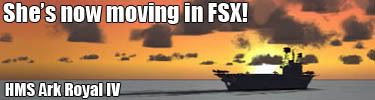
Ark Royal in FSX

Links to Classic British Flightsim themed images only please.
Please post in jpg or png format and no bigger than 1024 x 768

Moderators: Guru's, The Ministry

User avatar
basys
VC10
VC10
Posts: 524
Joined: 06 Apr 2006, 12:28
Location: EGNL, Barrow-in-Furness, Cumbria, UK
Contact:

Re: Ark Royal in FSX

Post by basys »

Hi Folks

Cheers Skippy.
Wearing my FS-Shipyards hat,
I am already using AIBTC to rework the world.
UK first, with IRL traffic. :thumbsup:

Just wondered if you CBFS bods
might already have the FTF already inhand.

PS
You can start on the carrier in FF.
Just needs to be from a saved flight.

ATB
Paul
Image
I've never felt so frustrated....... died so frequently/spectacularly/or needlessly....... yet had so much fun, in a long time.
Flight's Landing Challenges - Earn your wings !

User avatar
sketchy
Chipmunk
Chipmunk
Posts: 35
Joined: 15 Aug 2007, 13:19
Location: Los Angeles, CA (Ex Pat Brit, from Cornwall)

Re: Ark Royal in FSX

Post by sketchy »

basys wrote:Hi Folks
Cheers Skippy.
Wearing my FS-Shipyards ....... AIBTC to rework ....... IRL traffic...... :thumbsup:.... CBFS........ FTF......PS........ FF......ATB
Paul
..."lol"

Can I have a Consonant please Carol?!?! STUPID

I freely admit I am not totally sure, no correction, clueless! as to what you are talking about only being only a "Texture Monkey" (Thanks for that Skippy!) but I think that all sounds great Basys !
I shall leave all the "Black Art" of programming things in FS to you guys and be very thankful for you all for doing it!
Image
try anything once, except for incest and morris dancing!!

SkippyBing
Concorde
Concorde
Posts: 1460
Joined: 30 Aug 2006, 18:21

Re: Ark Royal in FSX

Post by SkippyBing »

Paul,

FTF would be an idea but I think we'd need a lot of new ship models. On the plus side we wouldn't need to add catapults to any of them as I still can't get more than one to work, and I know it's there because I added a flashing light to the attach point so the flight deck now looks like a disco! I'm sure I'm missing something really obvious. I've also now set up a route going from Gib to Malta and back which adds the challenge of reading the timetable and then trying to find her!
Image

User avatar
basys
VC10
VC10
Posts: 524
Joined: 06 Apr 2006, 12:28
Location: EGNL, Barrow-in-Furness, Cumbria, UK
Contact:

Re: Ark Royal in FSX

Post by basys »

Hi Folks

Skippy -
Info on configuration of Catapult/Arrestor Operations (FSXA)

Ensure you've appropriately indexed the attachpoints when adding
e.g. attachpt_catapult_start_n, attachpt_catapult_end_n

In case that wasn't you posting the initial reply -
For extra that didn't make it into the SDK, please see - Paul Lange's blog - Launch Bars and Carriers

Info on configuration of Aircraft for Catapult/Arrestor Operations (FSXA)
For investigations, please see - Lamont Clarke's wiki - Adapting FSX aircrafts to acceleration carriers

There's also a very useful "marker states" tool, linked at the foot of that page.

HTH
ATB
Paul
Image
I've never felt so frustrated....... died so frequently/spectacularly/or needlessly....... yet had so much fun, in a long time.
Flight's Landing Challenges - Earn your wings !

SkippyBing
Concorde
Concorde
Posts: 1460
Joined: 30 Aug 2006, 18:21

Re: Ark Royal in FSX

Post by SkippyBing »

Paul,

Thanks for that, I used the info on Paul Lange's site to get the JBD to animate, but again I can only get cat 1 to function. For cat 2 everything is identical bar swapping the 1 to a 2 in the appropriate places (including the user defined section of the object properties for those who are still keeping up). I've even gone as far as examining the .x file to see if I could spot anything in there, confusingly in one of my models the word catapult doesn't even appear and yet cat 1 works and cat 2 doesn't! I've had the catapults attached to the same mesh, attached to different meshes, including flashing lights in the effect code so I can tell the effect is actually being applied, included all four catapults, numbered one of them 0 rather than 1,2,3, or 4 and so far nothing. I'm really running out of ideas so if anyone has any ideas I'm all ears!
Of course this may mean that only one of my arrestor wires is working but I can't even think of a way to test that, and I can trap so I'm not going to worry about that!

Skippy
Image

SkippyBing
Concorde
Concorde
Posts: 1460
Joined: 30 Aug 2006, 18:21

Re: Ark Royal in FSX

Post by SkippyBing »

Right, having run out of ideas on this one I've uploaded it to FlightSim.com, AVSIM and Classic British Files. I imagine at some point over the weekend it should become available at one of them. It's only about a 4.5mb download and I've included an installer this time which should make the install easier.....
Image

User avatar
basys
VC10
VC10
Posts: 524
Joined: 06 Apr 2006, 12:28
Location: EGNL, Barrow-in-Furness, Cumbria, UK
Contact:

Re: Ark Royal in FSX

Post by basys »

Hi Folks

Cheers Skippy.

Please see your PMs.

ATB
Paul
Image
I've never felt so frustrated....... died so frequently/spectacularly/or needlessly....... yet had so much fun, in a long time.
Flight's Landing Challenges - Earn your wings !

User avatar
Chris Sykes
Concorde
Concorde
Posts: 1658
Joined: 18 Apr 2006, 11:50
Location: Northampton

Re: Ark Royal in FSX

Post by Chris Sykes »

Sweet ill be downloading when im home

User avatar
basys
VC10
VC10
Posts: 524
Joined: 06 Apr 2006, 12:28
Location: EGNL, Barrow-in-Furness, Cumbria, UK
Contact:

Re: Ark Royal in FSX

Post by basys »

Hi Folks

Ark Royal is available immediately - Carrier - HMS Ark Royal IV - R09 - (AI/Landable) (FSX)

Thanks to Skippy's kind permission.

HTH
ATB
Paul
Image
I've never felt so frustrated....... died so frequently/spectacularly/or needlessly....... yet had so much fun, in a long time.
Flight's Landing Challenges - Earn your wings !

User avatar
TSR2
The Ministry
Posts: 16757
Joined: 17 Jun 2004, 14:32
Location: North Tyneside, UK
Contact:

Re: Ark Royal in FSX

Post by TSR2 »

Downloaded on the mobile phone as I've no net at the mo and copied to my PC.... Brilliant!!! :thumbsup: :dancer:
Ben.:tunes:

ImageImageImage

Post Reply