Automated Flight with Glass...

Links to Classic British Flightsim themed images only please.
Please post in jpg or png format and no bigger than 1024 x 768

Moderators: Guru's, The Ministry

User avatar
petermcleland
Red Arrows
Red Arrows
Posts: 5201
Joined: 25 Jul 2004, 10:28
Location: Dartmouth, Devon
Contact:

Automated Flight with Glass...

Post by petermcleland »

I was delighted to discover that the twin GNS430s on my Cirrus, recognise the full approach procedures at McLeland Field...The RXP versions only work on old database versions and do not even know that McLeland Field exists. The Cirrus versions work like the FS9 GPS and search out ALL scenery that is installed by the user.

Anyway, in real weather today, I decided to try out the full ILS procedure for runway 31, without any radar vectoring, using the STec Autopilot and the GNS430 only, for all positioning flight to the ILS:-

Image
Looking at the MFD on the right, which is set to "Map", you can see that the aircraft is flying a pattern out over TONYM and NEILM to a holding pattern at NEILD. On the PFD on the left you can see that against the top left "Smart Button" the NAV is set at the moment to GPS2 and is showing the track and distance to NEILD (the holding pattern fix).

Image
Here is the same view seen in the Virtual Cockpit.

Image
The weather is very calm with only 1 knot of wind up here and although it is overcast, the weather at Base is VMC.

If you are interested in these technicalities then you can see the full sequence here:-

http://forum.fsscreenshots.com/dcboard. ... =full&page

Thanks for looking :flying:

User avatar
Prop Jockey
Vulcan
Vulcan
Posts: 418
Joined: 23 Oct 2004, 22:59
Location: EGLD
Contact:

Re: Automated Flight with Glass...

Post by Prop Jockey »

Very nice Peter :thumbsup: Perhaps you'll be able to trade-up to a perspective soon and fly the VNAV profile too !

Cheers

Rich
Image

Jetstreamsky
Viscount
Viscount
Posts: 121
Joined: 24 Nov 2004, 01:37
Location: Montreal, Quebec, Canada

Re: Automated Flight with Glass...

Post by Jetstreamsky »

It`s interesting to see all this magic happen and actually work Peter. I`ve messed about with the default GPS at times to see how I can use it more than just a moving map and a series of waypoints, but I haven`t got all the rest figured out yet. I`ve Attempted to use various options to make an approach to an airfield, but I have mixed results and not really sure what I`m doing. Do you know of a tutorial somewhere relevant to the default Flightsim gauge

User avatar
jonesey2k
Vintage Pair
Vintage Pair
Posts: 2613
Joined: 13 Aug 2004, 13:59
Location: Liverpool
Contact:

Re: Automated Flight with Glass...

Post by jonesey2k »

I rather like the old SR-22 :) She's a great little high-altitude, high-speed IFR tourer.
The Cirrus airframe protection system is quite nifty also.
Error 482: Somebody shot the server with a 12 gauge.

User avatar
forthbridge
Concorde
Concorde
Posts: 1595
Joined: 29 Aug 2007, 13:26
Location: Stirlingshire, UK

Re: Automated Flight with Glass...

Post by forthbridge »

:think:

Very interesting indeed!
Jim
Image

User avatar
petermcleland
Red Arrows
Red Arrows
Posts: 5201
Joined: 25 Jul 2004, 10:28
Location: Dartmouth, Devon
Contact:

Re: Automated Flight with Glass...

Post by petermcleland »

Jetstreamsky wrote:It`s interesting to see all this magic happen and actually work Peter. I`ve messed about with the default GPS at times to see how I can use it more than just a moving map and a series of waypoints, but I haven`t got all the rest figured out yet. I`ve Attempted to use various options to make an approach to an airfield, but I have mixed results and not really sure what I`m doing. Do you know of a tutorial somewhere relevant to the default Flightsim gauge
There is a pretty good tutorial built into FS9 somewhere in the learning section...I printed it out once but can't lay my hands on it now. Everything that I did in those pictures can be done with the default GPS...Even better in a way because you can use the Terrain Mode which gives a much better display (I have not found a way to do that in the Cirrus, perhaps Jonesey knows if it can be done?).

If you are going to use the GPS for an approach then make sure your destination has proper approaches as some addon scenery will have removed them. You can look at it on the ground before you go...Go to Flights > Flightplanner and load a FlightPlan...Check that it shows the track line on your GPS. On the GPS click the FP button and then the Procedures button...Select the runway to use at your destination and you will now be shown the available approaches...You can select one of these approaches and then you will be offered a selection of entries into the approach including ATC Vectors...In the case of these pictures I selected Runway 31, ILS, NEILD entry. I'll take some shots today of those selections to get it more accurately described :flying:

User avatar
jonesey2k
Vintage Pair
Vintage Pair
Posts: 2613
Joined: 13 Aug 2004, 13:59
Location: Liverpool
Contact:

Re: Automated Flight with Glass...

Post by jonesey2k »

As far as I know the terrain mode doesn't work but IIRC Eaglesoft may implement it in the future. It would function like RXP's Sandel ST3400.
Error 482: Somebody shot the server with a 12 gauge.

User avatar
petermcleland
Red Arrows
Red Arrows
Posts: 5201
Joined: 25 Jul 2004, 10:28
Location: Dartmouth, Devon
Contact:

Re: Automated Flight with Glass...

Post by petermcleland »

jonesey2k wrote:As far as I know the terrain mode doesn't work but IIRC Eaglesoft may implement it in the future. It would function like RXP's Sandel ST3400.
Thanks Jonesey...Let's hope they do something like that...I like what I've seen of the Cirrus and will be flying it some more today...I have not yet tried that parachute thing but I'll leave that till later :flying:

User avatar
petermcleland
Red Arrows
Red Arrows
Posts: 5201
Joined: 25 Jul 2004, 10:28
Location: Dartmouth, Devon
Contact:

Re: Switching Procedure...

Post by petermcleland »

Here is the procedure I used today to select the approach...We are at PAMA with a FlightPlan filed (LOADED) for PAMA to PAMA.
Image
I have used the top left smart button to select GPS2 as the nav device and these pictures will refer to me clicking the buttons on that lower GNS430 in the radio stack...I have fired up the two GPSs to their normal state with each showing the normal little map (there is no flight plan track to display as the flightplan is from here back to here!)...Now I will click the FPL button on that lower GNS430 and...
Image
...it shows the flight plan PAMA to PAMA...Now I will click the PROC button and...
Image
...and here you choose "Select Approach"...It is flashing already so you just click the ENT button and...
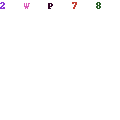
Image
...the available approaches are listed...today's wind favours runway 13 so I have clicked the RIGHT OUTER KNOB + once to bring the flashing cursor down to ILS 13...Click the ENT button and...
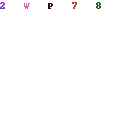
Image
...the available Transitions will be listed...I have moved the flashing cursor (RIGHT OUTER KNOB +) to flash on DAWNA...Click the ENT button and...
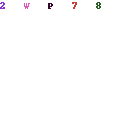
Image
...you are offered Load? or Activate?...I have moved the cursor to Activate?...Click the ENT button and...
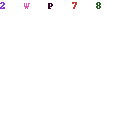
Image
...you can see that the approach has appeared on the PFC and on both GPSs with DAWNA flashing so click the ENT button again.
Image
In this aeroplane the approach also appears on the MFD Map and as soon as the Autopilot is engaged and its NAV button is pressed then the aircraft will fly the procedure.

If you fly ATC then you will get ATC IFR clearance for this flight as you have filed a flight plan...However, you can cancel this IFR clearance as soon as you are airborne, to avoid radar vectoring...You can then let the autopilot fly the procedure. Remember the you are responsible for the altitude and terrain clearance until established and locked on the glide slope :flying:


User avatar
forthbridge
Concorde
Concorde
Posts: 1595
Joined: 29 Aug 2007, 13:26
Location: Stirlingshire, UK

Re: Automated Flight with Glass...

Post by forthbridge »

:flying: :flying: :dancer:

Thankyou Peter!!!

I've just shot a run via TALLA to and from EGPH. This is exceptionally handy information :dancer: :dancer:
Jim
Image

Post Reply