Classic British Flight Sim forum.
Moderators: Guru's , The Ministry
johnsmithe15
Post
by johnsmithe15 05 Mar 2008, 08:07
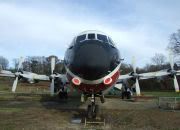
I get this funny little problem on the Tridents in FSX, anyone know what it could be and how I can get rid of it?
You see, it looks as if the front window panel has opened outwards, never seen this before.
Johnny
Garry Russell
The Ministry
Posts: 27180 Joined: 29 Jan 2005, 00:53Location: On the other side of the wall
Post
by Garry Russell 05 Mar 2008, 08:13
HI John
It looks like a problem with the small decal texture used to put the lettering on from the front
Try removing the TRI3DECAL bitmap.....(I think it's called) from the texture folder and see if that cleans it up....there will be no lettering there after but it might help
Sorry. a bit of a guess but worth a shot
Garry
Garry
"In the world of virtual reality things are not always what they seem."
TSR2
The Ministry
Posts: 16820 Joined: 17 Jun 2004, 14:32Location: North Tyneside, UK
Contact:
Post
by TSR2 05 Mar 2008, 10:10
Snag was introduced in SP2... fixed the glass, but buggered the "3" :roll:
Garry Russell
The Ministry
Posts: 27180 Joined: 29 Jan 2005, 00:53Location: On the other side of the wall
Post
by Garry Russell 05 Mar 2008, 10:16
Hi Ben
Have you tried removing the DECAL bitmap?? :think:
Looks like that is showing a transparency causing the other to show through from below.
Garry
Garry
"In the world of virtual reality things are not always what they seem."
Techy111
Battle of Britain
Posts: 3319 Joined: 15 Aug 2007, 13:51Location: Coming out of Retirement.
Post
by Techy111 05 Mar 2008, 10:48
Wasn't it a 1-11 that blew out a window......And the pilot should be modelled slapping the left hand fuselage......
OK OK I'm leaving..... :roll:
Tony
johnsmithe15
Post
by johnsmithe15 05 Mar 2008, 17:56
Indeed it was, the crew kept hold of him although they thought he was dead, probably didnt want him going through either one of the engines.
basys
VC10
Posts: 524 Joined: 06 Apr 2006, 12:28Location: EGNL, Barrow-in-Furness, Cumbria, UK
Contact:
Post
by basys 05 Mar 2008, 19:38
Hi Folks
Removing the texture will cause FSX to continually seek for it,
whenever it's supposed to be in view.
Depending on your PC's capabilities, and FSX slider's settings,
this may impact your FPS.
Try converting the decal from DXT1 to DTX3.
See -
FSDeveloper - Wiki - Texture Formats (Overview)
HTH
ATB
Paul
johnsmithe15
Post
by johnsmithe15 08 Mar 2008, 12:00
Hi Paul,
petermcleland
Red Arrows
Posts: 5201 Joined: 25 Jul 2004, 10:28Location: Dartmouth, Devon
Contact:
Post
by petermcleland 08 Mar 2008, 12:10
johnsmithe15 wrote: Hi Paul,
Johnny, you need the FSX version of ImageTool (not the FS9 version).
On my system it is here:-
G:\Program Files\Microsoft Games\Microsoft Flight Simulator X SDK\SDK\Environment Kit\Terrain SDK\ImageTool.exe
Not that I ever use it or anything else FSX :think:
johnsmithe15
Post
by johnsmithe15 08 Mar 2008, 22:16
I dont have it but Im getting it apparently its in SP2 and there is also an SDK update available so getting that too. Thanks for the tip.